Motion Alerts for Everything Except Cars or Animals
Choose which motion alerts matter with Reporter AI Detect Everything and category exclusions for vehicles, animals, or people.
A driveway can have a lot going on: people walking in, wildlife crossing, a gate moving, and cars passing. You may want to know about unusual motion without hearing an alert every time a familiar type of activity appears.
With Reporter AI Wireless Alert, you can choose a different approach from simply blocking a whole area of the view. Its Detect Everything setting is designed to respond to general motion, while allowing you to specifically exclude a selected target category: human, animal, or vehicle.
Why excluding part of the picture isn't always the answer
A motion zone can be useful when an area is never important. But what if the same part of the driveway includes passing vehicles, people walking, and other activity you do want to know about? Excluding the entire area may also hide events you care about.
Reporter offers another choice: keep Detect Everything on and use the target buttons to specifically exclude a category. For example, you could exclude vehicles while still watching for other activity, or exclude animals when deer routinely cross the yard. Reporter classifies targets from motion-triggered images; the result depends on the scene, settings, and the system's classification. It will not identify or exclude every event perfectly.
How to set Detect Everything and exclude a target
Use the indoor hub's touchscreen to choose settings for the sensor you want to configure:
- Open Settings, then Detect.
- Select the desired sensor from the dropdown at the top left.
- Turn on Detect Everything to respond to general motion, not only selected person, animal, or vehicle categories.
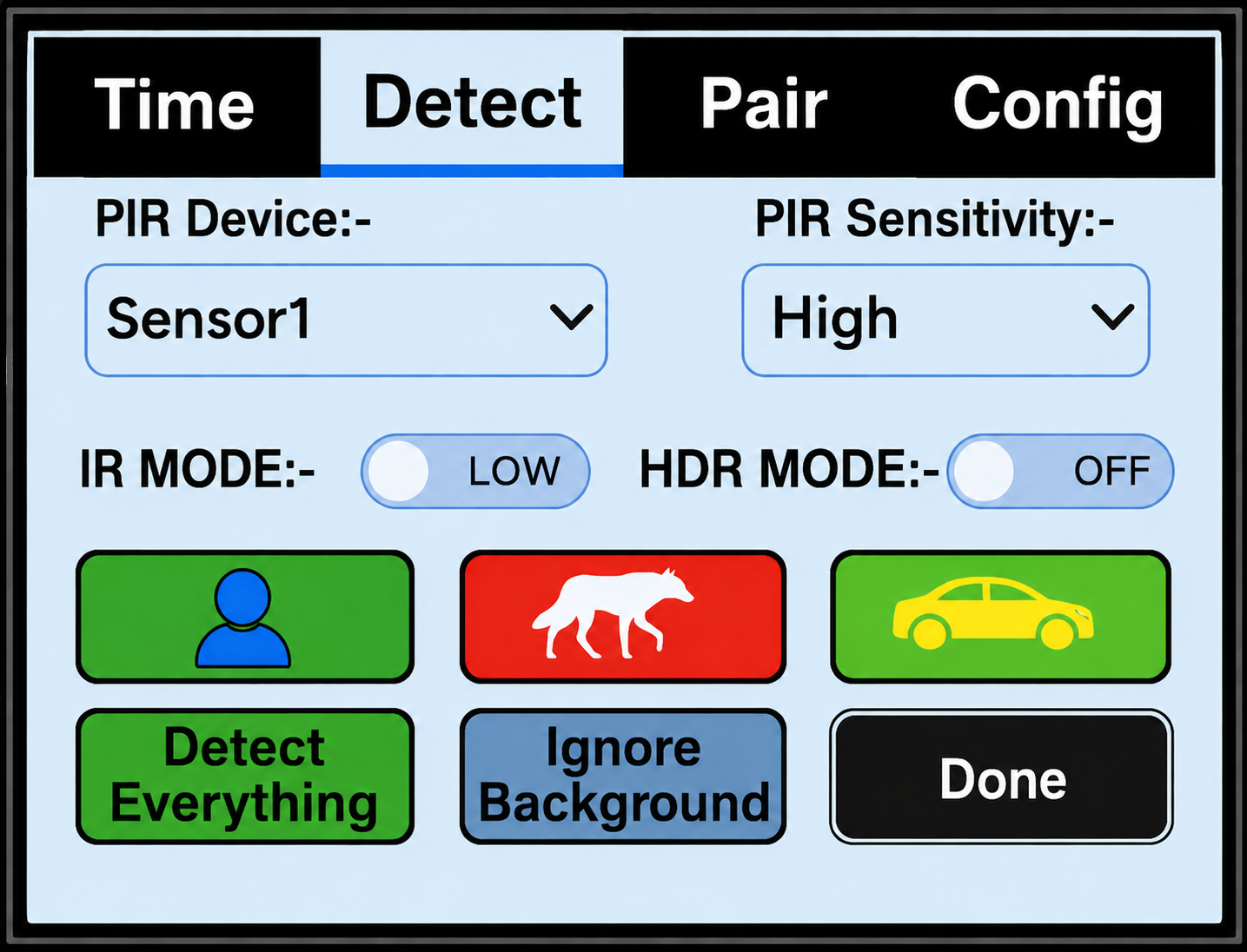
- Tap the target button for the category you want to exclude until it turns red. The manual says to press the target button twice to reach red.
- Tap Done to save, then test the setting in the actual monitored area.
The button colors have different meanings: green alerts for that target type; gray ignores that type; red specifically excludes that type when Detect Everything is on. In the image above, the animal button is red. To exclude vehicles instead, use the vehicle button. See the full instruction manual for the Detect settings and other controls.
Examples for a driveway, yard, or gate
- Keep an eye on general driveway activity while excluding vehicles: turn on Detect Everything and set the vehicle button to red. Test using the direction and distance vehicles normally travel.
- Watch for activity around a barn while excluding animals: use Detect Everything and set the animal button to red. This may suit a place where routine animal movement is less useful than other activity.
- Monitor a gate and adjust for your property: configure that sensor separately, then walk through the area and review the images on the hub before deciding whether the setting is right.
The best setting depends on what you want to see. If the sensor incorrectly classifies something, an unwanted alert may still occur or an event may be missed. Review results and adjust as necessary; no alert system guarantees detection of every event.
Detect Everything versus selecting specific categories
If you only want alerts for recognized people, animals, or vehicles, choose the categories that matter to you on the Detect screen. Detect Everything is for a broader choice: react to general motion and specifically exclude a category when desired. You can set the options for each sensor, so a driveway and a barn do not have to use the same approach.
Other settings can help you tune a busy location. The manual describes PIR Sensitivity and Ignore Background; start with its recommended settings and adjust after real-world testing. A sensor aimed across a path, level or slightly downward, can help you monitor the intended area. Avoid aiming at moving branches or direct sunlight. Read where to place a wireless driveway alert sensor for more placement guidance.
See what caused the alert
Reporter combines an outdoor motion sensor with an indoor touchscreen hub. When the system sends an alert, the hub displays the captured still image so you can see what prompted it. The sensor communicates wirelessly with the hub; it does not need Wi-Fi at its location. Optional phone alerts require Wi-Fi at the hub and the Reporter app.
If you're comparing Ring, Blink, eufy, or another motion camera, check each model's settings and whether it has the kind of category controls you need. Reporter is an image-based wireless alert system, not a continuous video camera. Its Detect Everything and category exclusions offer a way to tailor alerts to the activity that matters to you.
Summon Gear
Practical guides from the team behind Reporter Ai Wireless Alert.