Driveway Alarm Keeps Going Off? Get Alerts for What Matters
A driveway alarm should tell you about arrivals that matter. Learn how to reduce unwanted alerts and choose people, vehicle, or animal alerts with Reporter Ai.
When a driveway alarm sounds again and again, the problem is not always a faulty sensor. An animal may have crossed the lane, a person may have walked past, or motion may have occurred outside the area you care about. The alarm detected something—but it did not tell you whether that something deserved your attention.
If you only want to know when a vehicle arrives, an alert for every animal can feel like a false alarm. The answer is to improve both where you detect and what earns an alert.
Start with the area you are watching
Look at the driveway from the sensor's position. Does it also face moving branches, sprinklers, a road, or another busy area? Adjust its aim so the path you care about is the main area of detection. For people and vehicles, Reporter Ai's setup guide recommends mounting about 6–10 feet high, aiming level or slightly downward, and aiming across the path of travel when possible.
Then test the sensor in its installed position. Placement can reduce unnecessary triggers, but it cannot decide which arrivals matter to you.
Choose the activity that should interrupt you
Reporter Ai's outdoor sensor detects motion, captures a still image, and checks whether the target appears to be a person, vehicle, or animal. On the indoor hub, you select which of those categories should produce an alert for each sensor.
- Vehicle alerts at the driveway: Know when someone drives in without asking to be alerted about every animal.
- Person alerts at a side gate: Focus on foot traffic at that entrance.
- Animal alerts near a garden: Make animal activity the reason for the alert.
You can select multiple categories. During setup, use Detect Everything if you want to check all activity before narrowing the alerts. The detection controls also include PIR Sensitivity and Ignore Background settings for tuning nuisance or missed alerts.
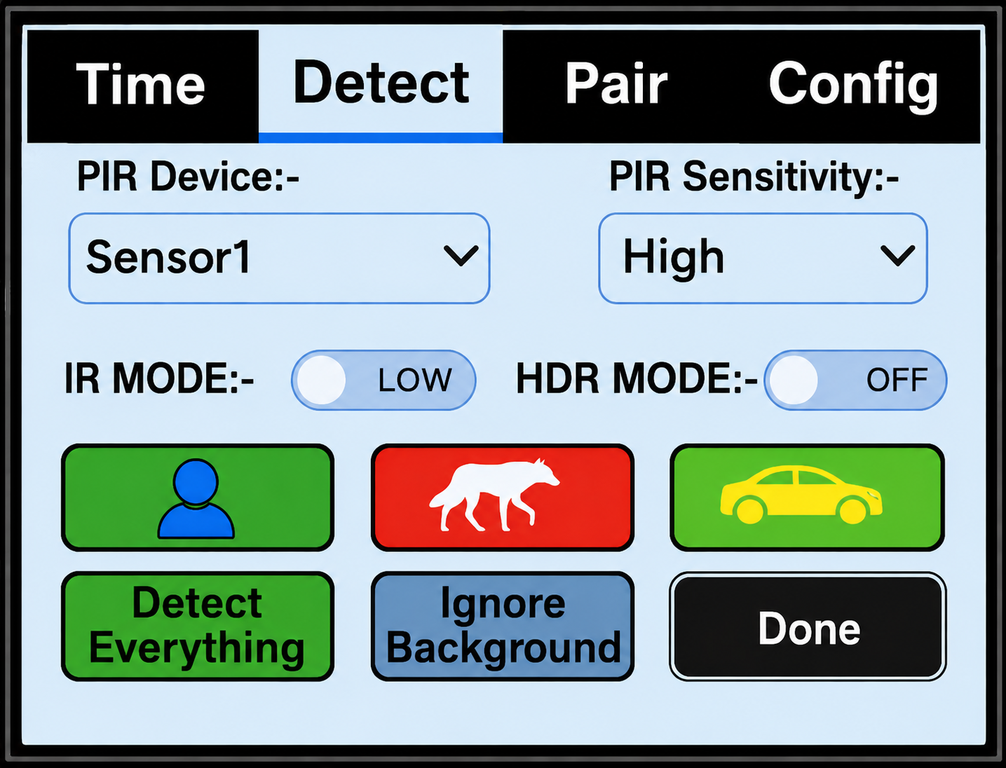
Reporter Ai lets you choose the alert categories for each outdoor sensor.
Know what caused the alert
A sound alone leaves you wondering whether to look out the window or walk outside. Reporter Ai sends a captured event image to its indoor hub, where you can review what was detected. Its outdoor sensor uses a long-range local wireless link, so it does not need Wi-Fi at the driveway. Optional phone alerts require the hub to have Wi-Fi internet access.
Object classification is not a guarantee that every event will be labeled correctly. Test the categories you select in your actual installation, and adjust the aim or settings if you receive unwanted alerts or miss activity you expected.
Turn a noisy driveway into a useful arrival alert
If a basic chime gives you too many interruptions and too little information, see how Reporter Ai's image-verified driveway alert works. Watch the demo to see the sensor, image, and hub experience. When you are ready to cover your own driveway, view the complete Reporter Ai kit and current ordering details.
Summon Gear
Practical guides from the team behind Reporter Ai Wireless Alert.