Too Many Doorbell Camera or Security Camera Alerts? Choose What Matters
Too many doorbell or security camera notifications? Learn what to adjust, then see how Reporter Ai alerts you to selected activity at a driveway or gate.
Your doorbell camera or wireless security camera may show excellent video. But if your phone signals for activity you do not care about, it becomes harder to notice the arrival you do care about.
Before choosing another device, ask two questions: Which events should interrupt me? And where do I need to know about them? The answers may point to a setting on your current camera—or to a different kind of alert at a gate or driveway.
First, improve the camera you already have
Camera features vary, so check the controls your model provides. An activity zone may keep the camera focused on the approach instead of a nearby road. Sensitivity settings may help with repeated motion notifications. Some cameras also let you select alerts for people, vehicles, or animals. Adjust one setting at a time and test that important activity is still reported.
If that solves your problem, keep using the camera. Live viewing, recorded video, a visitor button, and two-way talk are good reasons to have a video doorbell or security camera.
When the important arrival happens farther away
A front-door camera cannot tell you early that a vehicle has entered a long driveway. A gate or farm entrance may also be beyond reliable Wi-Fi coverage. In those places, the job may be arrival awareness rather than continuous video.
Reporter Ai is built for that job. Its outdoor sensor detects motion, captures a still image, and classifies the target as a person, vehicle, or animal. You choose which categories should alert you at each sensor. The alert travels over Reporter Ai's local wireless link to an indoor hub, without Wi-Fi at the outdoor sensor. The hub shows the image so you can see why you were alerted.
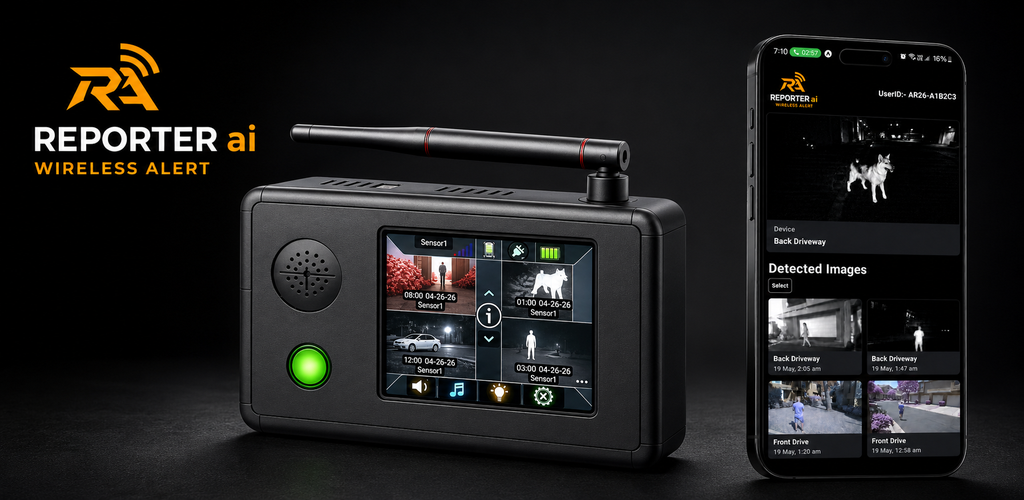
The indoor hub provides local alerts. Optional phone alerts require Wi-Fi internet at the hub.
For example, you might select vehicles at the driveway and people at a gate, while leaving animal alerts off at those locations. If animals are the reason you are monitoring another area, you can select them there instead. The setup guide shows the category settings for each sensor.
Choose the system that fits the job
- Choose a video doorbell for a visitor button, live conversation, or video at the front door.
- Choose a security camera when viewing or recording video is the priority.
- Consider Reporter Ai when you want selected arrival alerts with still-image context at a driveway, gate, or other outdoor approach.
Reporter Ai is not a live-video doorbell or continuous-recording camera. Classification can also make mistakes, so no device can promise zero unwanted alerts. Its advantage is letting you decide which types of arrival should earn your attention, then showing you a captured image of the event. See the doorbell camera comparison for a closer look at the differences.
See whether Reporter Ai fits your property
If constant notifications have made your current alerts less useful, watch Reporter Ai in action. Explore the system specifications, including range and battery-life conditions, then view the complete kit and current ordering details to decide whether it is the right investment for your property.
Summon Gear
Practical guides from the team behind Reporter Ai Wireless Alert.